Bazel for iOS in 2026: What It Fixes and What It Breaks
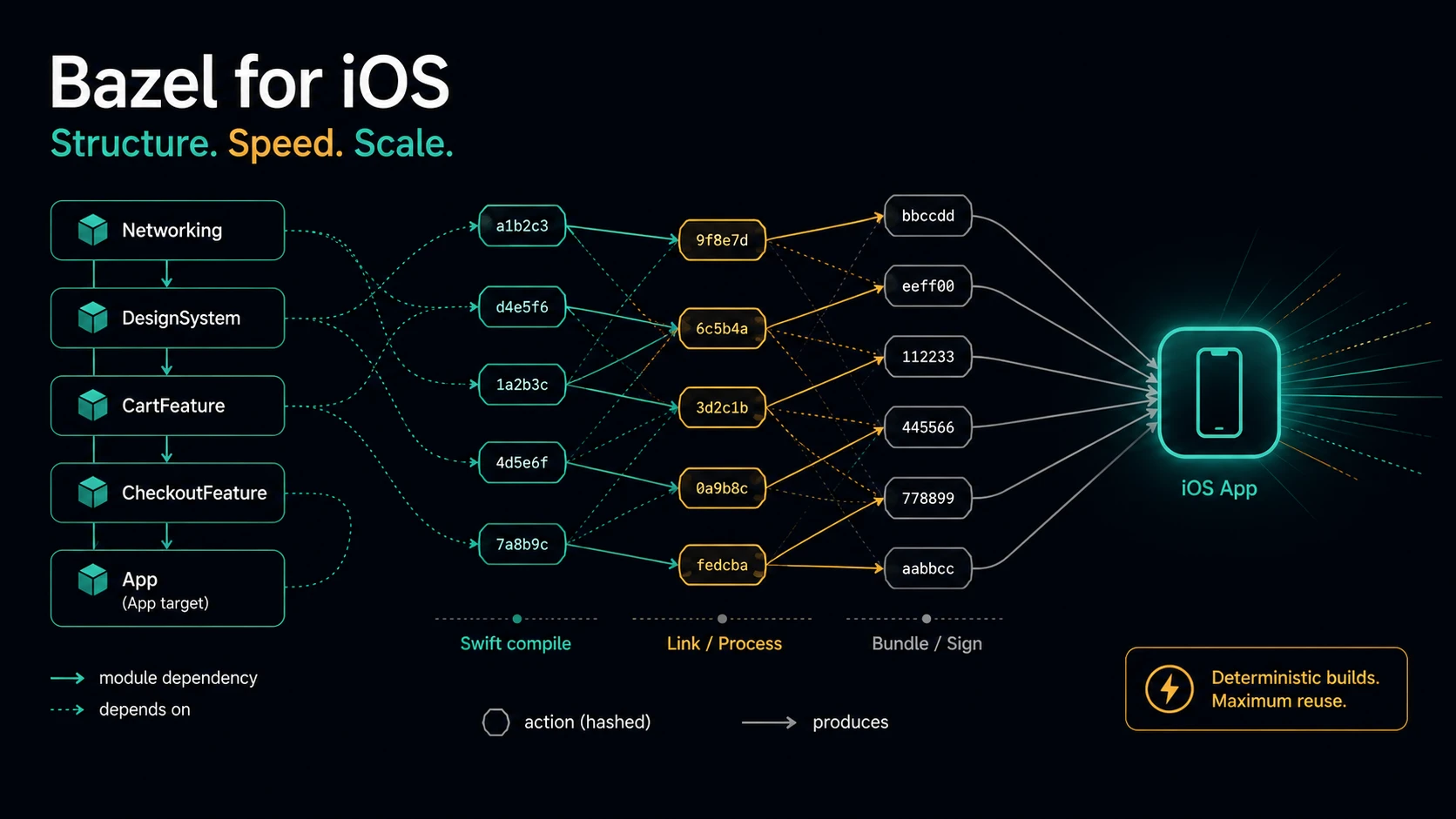
Every iOS team hits the same wall. The app grows, the modules grow, and one day a small pull request takes 45 minutes to go green. You change one line in a networking file, and CI rebuilds and re-tests the whole app. Again.
Bazel is the most serious answer to that problem. It is also the most demanding one. Spotify used it to cut their iOS CI feedback loop from about 80 minutes to about 20. Gojek went from a 30-minute p50 to under 10 minutes. And both of them paid for it — in engineer time, in tooling, and in Xcode features they had to give up.
This post is my attempt at an honest guide: what Bazel really does, how it fits an iOS codebase in 2026, how BuildBuddy and selective testing work, whether SwiftUI Previews survive, and — most important — how to decide if you should even try.
TL;DR — Bazel gives you a correct, cacheable, module-level build graph. On a large modular iOS app that means much faster CI, shared caches between machines, and real dependency rules. The price is a steep learning curve, one person who owns the build, no Xcode Archive action, and SwiftUI Previews that have been broken for app targets since Xcode 16. If your CI is under 10 minutes, do not do this.
What Bazel actually is
Most build tools ask "what changed?" and then guess what to rebuild. Bazel asks a different question first: "what exactly does this output depend on?"
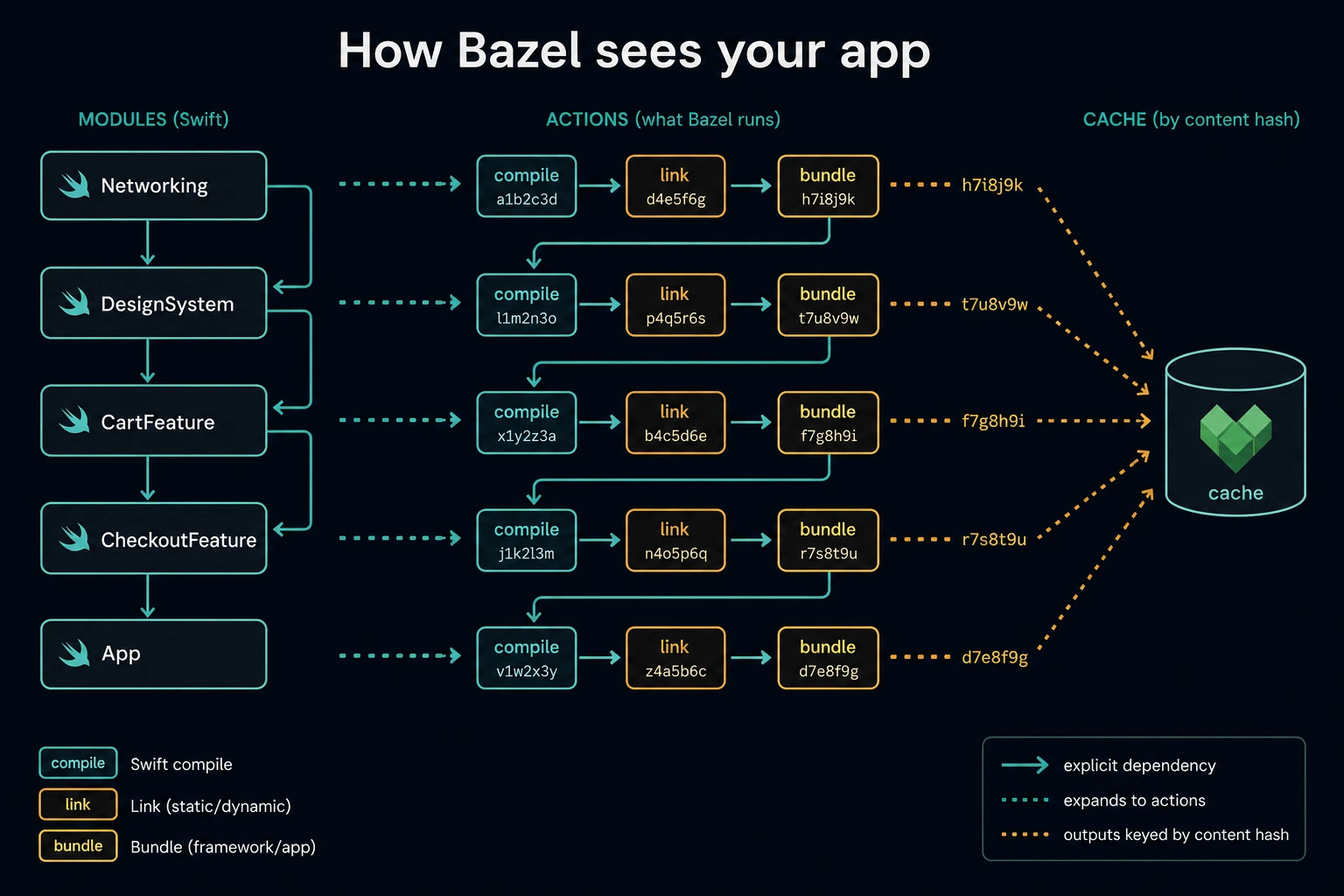
You describe your project in BUILD files. Each file declares targets — a Swift module, a test bundle, an app. Each target lists its dependencies explicitly. Nothing is implicit. From all of this, Bazel builds a graph of actions: every single command that has to run, with the exact set of input files it reads and output files it writes.
Because Bazel knows the exact inputs of every action, it can hash them. That hash becomes a cache key. If the key already exists in a cache — on your disk, or on a server your whole team shares — Bazel skips the work and downloads the result.
This is why the word hermetic shows up everywhere in Bazel documentation. A hermetic build gives the same output for the same inputs, no matter which machine runs it. That property is what makes a shared cache safe. If a build step secretly reads something undeclared — a file outside the graph, an environment variable, the current time — the cache starts lying to you, and Bazel's whole value falls apart.
A build runs in three phases: loading (read and evaluate the BUILD files), analysis (turn rules into a concrete action graph), and execution (actually run the actions). Analysis results are cached in memory between builds, which is why the second bazel build in a session feels so much faster than the first.
Where Bazel is in 2026
If you last looked at Bazel a few years ago, three things have changed.
Bazel 9 is the current LTS line. The newest stable release is 9.2.0 (July 2026), and Bazel 9 is supported until December 2028. Bazel 8 is still maintained; Bazel 6 reached end of support in January 2026.
WORKSPACE is gone. Bazel 8 disabled it by default, and Bazel 9 removed the code entirely. Dependencies now live in a MODULE.bazel file, using a system called Bzlmod, with versions resolved from the Bazel Central Registry. This migration was, by the community's own admission, the most painful change of the last few years — but it is finished now, and new projects never see the old system.
Bazel core got smaller. Language rules moved out of the Bazel binary into separate rule sets. For iOS this has one very concrete effect: if you have any Objective-C, objc_library no longer exists by default and must be loaded from @rules_cc.
Two more small but pleasant changes in Bazel 9: the bazel sync command is gone (use bazel fetch --all), and on macOS the build cache moved from /private/var/tmp to $HOME/Library/Caches/bazel — so a macOS update no longer wipes it.
The iOS rule stack
Bazel itself knows nothing about iOS. Apple support comes from a set of open-source rule sets. Here is the 2026 line-up:
rules_apple— bundling, packaging, code signing, and the app/test rules (ios_application,ios_unit_test,ios_ui_test, extensions, frameworks). Latest stable: 4.5.3. A 5.0.0 major is in release-candidate stage.rules_swift— Swift compilation:swift_library,swift_test, Swift macros, explicit modules. Latest stable: 3.6.1, with 4.0.0 in RC.apple_support— the Apple C/C++ toolchain plus platform definitions. Required since Bazel 7 for any non-macOS Apple platform. Latest: 2.8.0.rules_xcodeproj— generates an.xcodeprojfrom yourBUILDfiles so you can still work in Xcode while Bazel does the building. Latest: 4.1.0.rules_swift_package_manager— pulls your existing SPM dependencies into the Bazel graph. Actively maintained, ~biweekly releases.
One important warning: rules_ios is deprecated. For years it was the friendly on-ramp for teams coming from Xcode, with mixed Objective-C/Swift modules and CocoaPods support. Its main maintainer (Square) announced in November 2025 that they are moving off it, and rules_xcodeproj dropped support for it in early 2026. If you are starting today, go straight to rules_apple + rules_swift. For mixed-language modules, rules_swift now ships mixed_language_library.
A minimal iOS app
This is roughly the whole setup for a small app:
# MODULE.bazel
bazel_dep(name = "apple_support", version = "2.8.0")
bazel_dep(name = "rules_apple", version = "4.5.3")
bazel_dep(name = "rules_swift", version = "3.6.1")
bazel_dep(name = "rules_xcodeproj", version = "4.1.0")
# BUILD.bazel
load("@rules_apple//apple:ios.bzl", "ios_application", "ios_unit_test")
load("@rules_swift//swift:swift_library.bzl", "swift_library")
load("@rules_xcodeproj//xcodeproj:defs.bzl", "top_level_target", "xcodeproj")

swift_library(
    name = "Sources",
    srcs = glob(["Sources/**/*.swift"]),
)

ios_application(
    name = "iOSApp",
    bundle_id = "com.example.app",
    families = ["iphone", "ipad"],
    infoplists = ["Info.plist"],
    minimum_os_version = "17.0",
    deps = [":Sources"],
)

ios_unit_test(
    name = "Tests",
    minimum_os_version = "17.0",
    test_host = ":iOSApp",
    deps = [":TestLib"],
)

xcodeproj(
    name = "xcodeproj",
    project_name = "iOSApp",
    tags = ["manual"],
    top_level_targets = [
        top_level_target(":iOSApp", target_environments = ["device", "simulator"]),
    ],
)
The commands you will actually type
bazel build //:iOSApp                 # simulator build
bazel run   //:iOSApp                 # builds AND launches it on the simulator
bazel run   //:iOSApp --ios_multi_cpus=arm64   # installs on a connected device
bazel test  //...                     # everything
bazel test  //Features/Cart/... --test_output=errors

bazel run //:xcodeproj                # (re)generate the Xcode project

# choose the simulator (these are rules_apple build settings, not plain flags)
bazel run //:iOSApp \
  --@rules_apple//apple/build_settings:ios_simulator_device="iPhone 17 Pro" \
  --@rules_apple//apple/build_settings:ios_simulator_version=26.0

# ask the graph a question
bazel query 'kind("ios_unit_test rule", rdeps(//..., //Modules/Networking:Networking))'
bazel run //:iOSApp building and launching the app on the simulator is the moment Bazel starts to feel normal instead of alien.
Good news for tests: Swift Testing works. The rules_apple xctestrun runner learned to parse swift-testing output in March 2025, so @Test functions run fine inside ios_unit_test. (The lower-level swift_test rule in rules_swift still documents only XCTest-style discovery — for iOS you want the rules_apple test rules anyway.)
Why modular projects gain the most
Bazel's benefits scale with how modular you already are. On a single-target app, it gives you almost nothing. On a 100-module app, it changes the shape of your day.
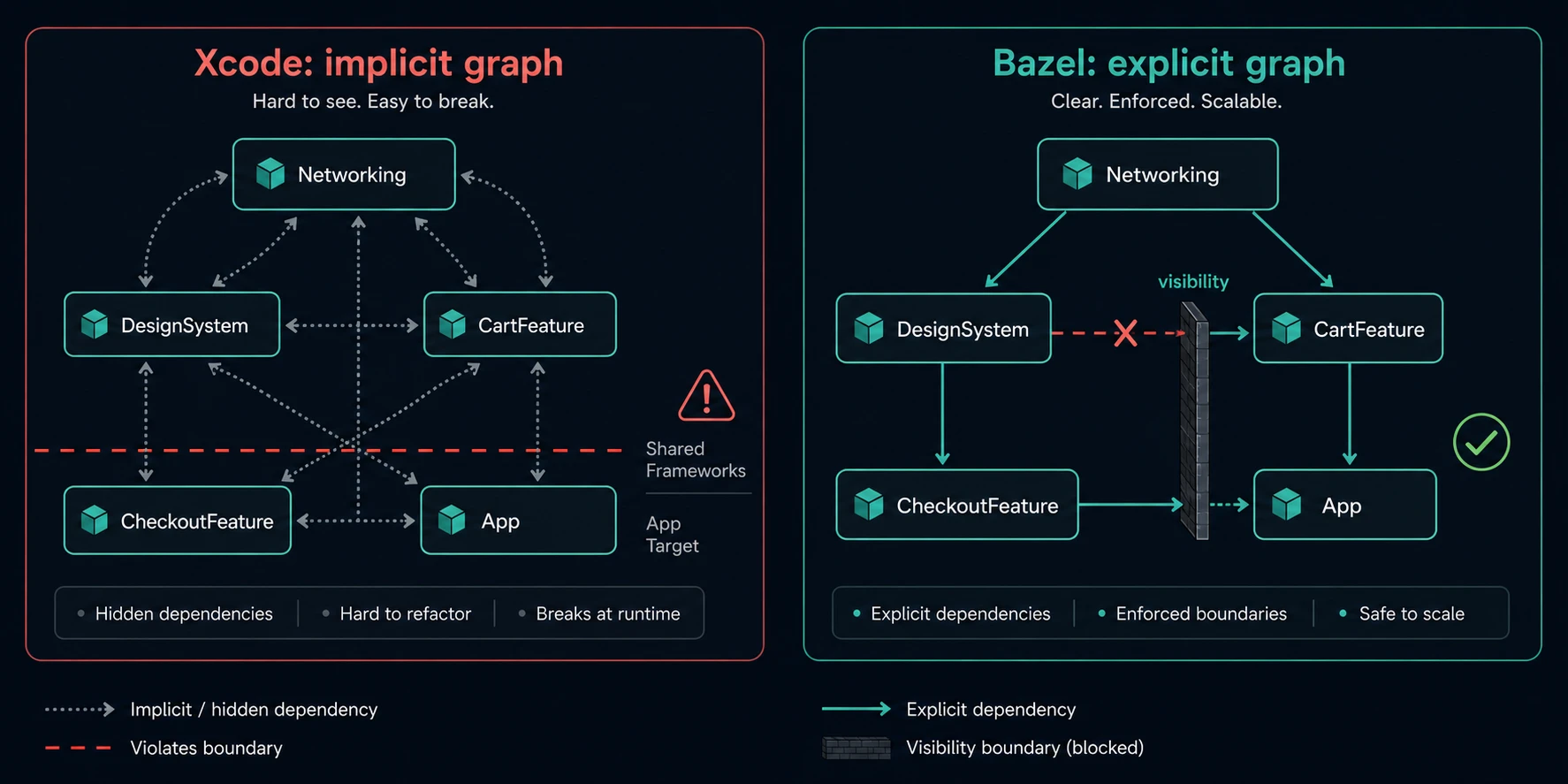
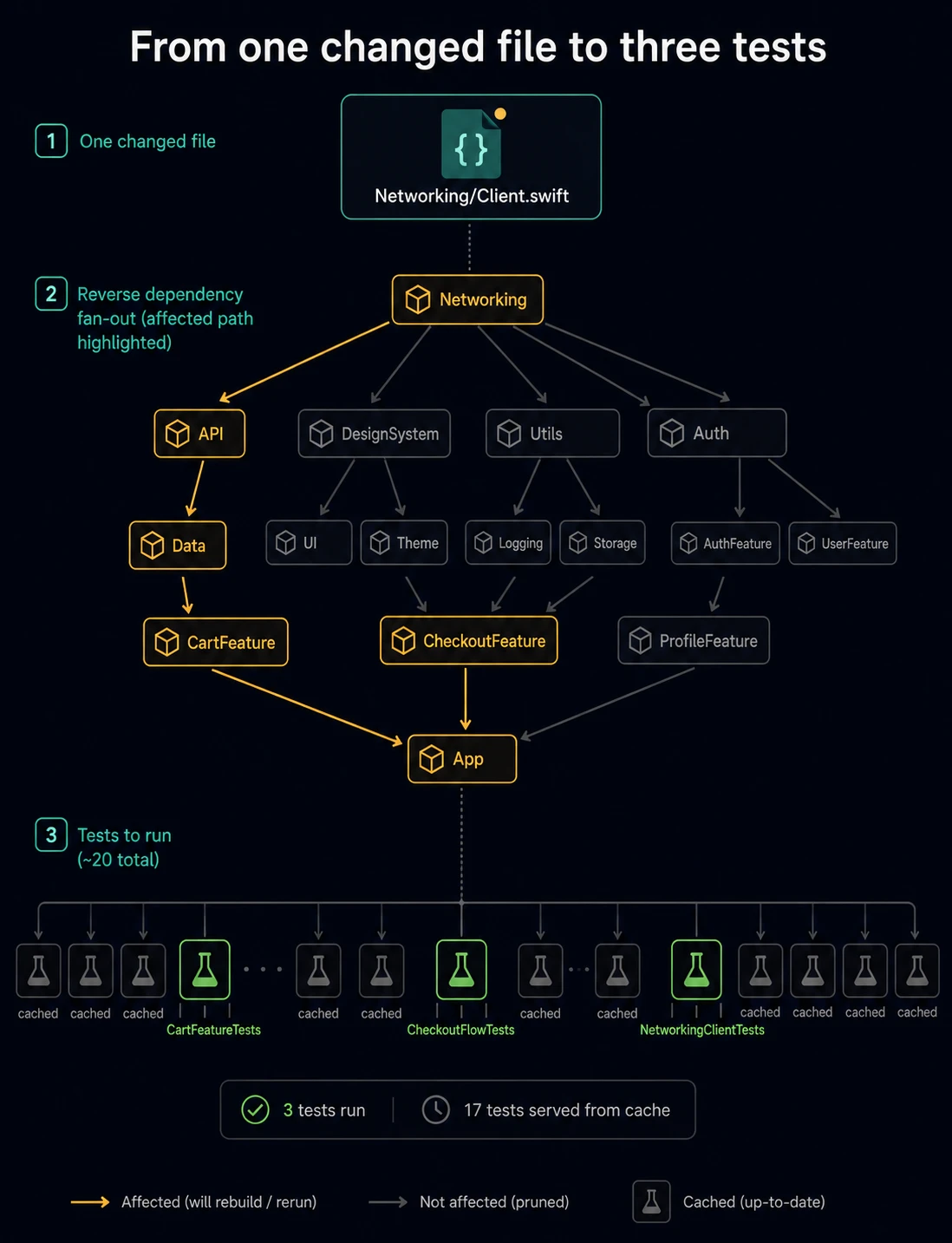
Incrementality becomes real. In Xcode, a change in a low-level module often triggers far more rebuilding than it should, because dependencies are implicit and the build graph is not fully known ahead of time. In Bazel, a change to Networking rebuilds Networking and exactly the targets that depend on it. Nothing else. Everything untouched is served from cache.
Boundaries become build errors, not code-review comments. This is the part people underrate. Bazel targets are private by default, and visibility is checked during analysis — before a single file is compiled. So you can express architecture as a rule:
# //Features/Checkout/BUILD.bazel
package(default_visibility = ["//visibility:private"])

# Other features may depend on the Interface...
swift_library(
    name = "CheckoutInterface",
    srcs = glob(["Interface/**/*.swift"]),
    deps = ["//Core/Models"],
    visibility = ["//:features"],
)

# ...but only the app can link the Implementation.
swift_library(
    name = "Checkout",
    srcs = glob(["Sources/**/*.swift"]),
    deps = [
        ":CheckoutInterface",
        "//Core/Networking",
        "//Features/Cart:CartInterface",   # interface only — enforced
    ],
    visibility = ["//App:__pkg__"],
)
Slack built its iOS modularization on exactly this idea: features may link the Interface module of another feature, never its Implementation. With Bazel, that is not a convention someone has to police in review. It fails the build.
The upcoming rules_swift 4.0 adds a second layer of this with an opt-in layering check (--features=swift.layering_check_swift): importing a module that is not a direct dependency becomes a compile error. Today it is still in release candidates, but it is the strongest module-boundary tool the iOS ecosystem has ever had.
Per-module test targets. Each module gets its own test target, which means tests can be selected, cached, and skipped individually. That is the foundation of the selective testing section below.
BuildBuddy: the cache that makes it worth it
A local Bazel cache is nice. A shared cache is what changes CI. BuildBuddy is the most popular way to get one without building the infrastructure yourself.
It gives you four things: a results UI for every build (timing profile, cache stats, test grid, action explorer), a remote cache, remote execution (RBE), and a result store.
The starting point is two lines. No account needed:
# .bazelrc
build --bes_results_url=https://app.buildbuddy.io/invocation/
build --bes_backend=grpcs://remote.buildbuddy.io
Now every build prints a URL. Click it and you can see which actions ran, how long each took, and what your cache hit rate was. This alone is worth doing, because you cannot fix a slow build you cannot see.
Adding the cache is three more lines:
common --remote_cache=grpcs://remote.buildbuddy.io
common --remote_timeout=10m
common --remote_header=x-buildbuddy-api-key=YOUR_API_KEY
The one thing every iOS developer must understand
There is a hard line between remote caching and remote execution, and it decides your whole strategy.
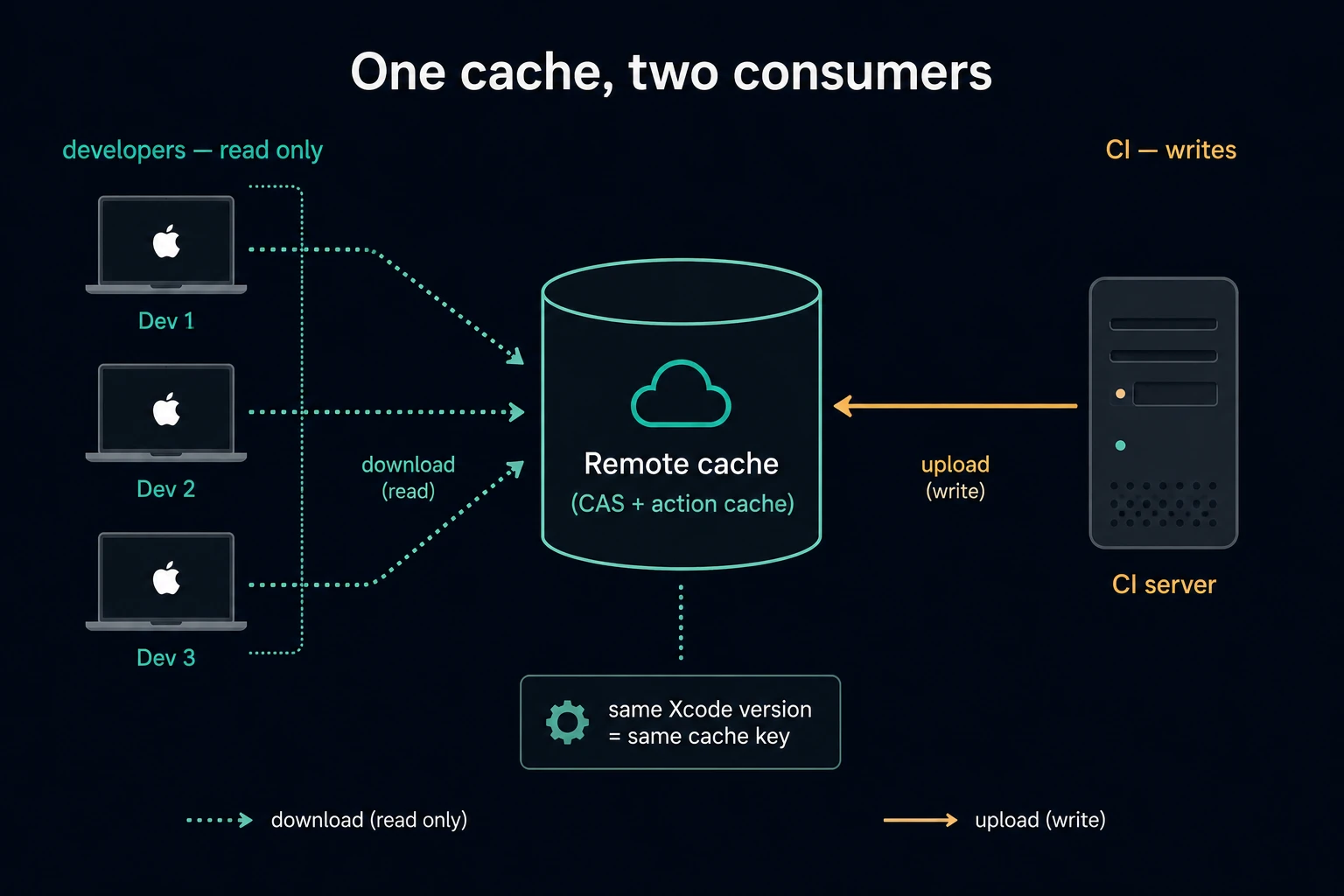
Remote caching works perfectly for iOS. Bazel still runs swiftc and clang on your Mac; it only uploads and downloads the results. No special infrastructure is needed.
Remote execution does not — not on the cheap. Apple's toolchain only runs on macOS, so an iOS action must execute on a Mac. BuildBuddy's managed executor pool is Linux-only; macOS execution is documented as available only with self-hosted executors, and Mac cores appear on the pricing page at $45/core on the Team plan. The strongest signal of all: BuildBuddy's own Mac CI runs cache-only, with a TODO in their config about enabling Mac RBE.
So the honest recommendation is: start with remote caching, and treat RBE as an advanced move. Most of the published wins come from caching anyway.
If you do want it, BuildBuddy publishes a working Linux-host → macOS-executor demo. The trick is a platform with OSFamily: darwin and an xcode_config telling the Linux host which Xcode the remote Macs have.
What the numbers look like
The best public iOS data point is Mercari, who moved their iOS remote cache to BuildBuddy. A debug build on an M1 Pro MacBook:
- 256 seconds with no cache
- 75 seconds with the remote cache
- 37 seconds with remote execution
And in one CI run, only 2 of 217 tests actually executed. The rest were served from cache. (That write-up is from 2023, so treat the exact seconds as historic, not as a promise.)
Pricing, plainly
The Personal plan is free — 10 users, 100 GB of cache transfer, community support. The Team plan is usage-based, priced per GB of cache transfer beyond that; the actual per-GB number is not published on the page. Enterprise is a custom quote. There is no public per-seat price, and Mac cores are the only real dollar figure they publish.
Alternatives worth knowing: EngFlow (commercial RBE + UI), Bitrise (mobile-native build caching), Buildbarn and NativeLink (self-hosted execution), and bazel-remote — a single Apache-2.0 binary that does nothing but cache. If you only want a shared cache and you have somewhere to run a server, bazel-remote is the cheapest path that exists.
Bazel in CI/CD
Once CI and developers share one cache, a few rules keep it healthy.
Let CI write, and everyone else read. This is Bazel's own advice. Developers get a read-only key so a broken local environment can never poison the shared cache:
build --noremote_upload_local_results
build:ci --remote_upload_local_results
Pin Xcode, or nothing will ever hit. By default Bazel builds an Xcode config from your machine and picks the newest installed version. Two developers on different Xcode versions produce different cache keys and share nothing. The fix is to check an xcode_version / xcode_config pair into the repo:
build --xcode_version_config=//:host_xcodes
Be aware that changing Xcode versions can still require bazel clean --expunge; the upstream bug has been open since 2023.
Remap absolute paths. Anything that embeds a machine-specific path into an output destroys cache hits. Real iOS repos ship a block like this:
build --features=debug_prefix_map_pwd_is_dot
build --features=oso_prefix_is_pwd
build --features=relative_ast_path
build --features=remap_xcode_path
build --features=swift.remap_xcode_path
build --features=swift.cacheable_swiftmodules
Warm the cache after merge. There is no first-party "cache warming" feature, but the pattern is simple: a post-merge job on main that builds everything with uploads enabled, so the next PR starts warm. rules_xcodeproj even ships an aspect for this that skips non-compilation work.
Know your runners. GitHub's standard macOS runners are small — 3 CPUs and 7 GB on Apple Silicon — and cost about ten times a Linux runner per minute. Many teams end up on self-hosted Macs (Gojek runs 45 Mac minis) or on providers like Namespace or Depot. One warning: Cirrus CI shut down in June 2026, so do not plan new iOS CI on it.
A genuinely useful 2026 addition: bb detect nondeterminism runs a Bazel command twice with caching off and diffs the execution logs to find the non-hermetic actions that are silently costing you cache hits.
Selective testing: only run what changed
This is where a modular Bazel repo pays for itself. But there are two separate layers here, and mixing them up is the most common misunderstanding about Bazel and CI. One is free and built in. The other is a tool you add on top.
Layer 1: test results are cached, not just build outputs
This is the part people miss. To Bazel, running a test is just another action with declared inputs — so its result gets cached like everything else. Not the compiled test binary. The pass/fail result itself.
That means if a test target's transitive inputs did not change since the last time it passed, Bazel does not run it. It prints:
//Features/Cart:Tests (cached) PASSED in 0.0s
And because the cache is shared, this works across machines. A test that passed on main this morning is already green for every PR that does not touch it. Your CI machine has never run it and does not need to.
This is exactly what the Mercari number earlier in this post actually shows. In their CI run, 2 of 217 tests executed — and their write-up is explicit that the other 215 "were not affected by the pull request that triggered this run, and thus they were fetched from the remote cache." No selective-testing tool was involved. That was bazel test plus a remote cache.
So the honest answer to "does only the changed part's tests run?" is: yes, by default, as soon as you have a cache. You type bazel test //... and Bazel quietly does the filtering for you.
The flag that controls it is --cache_test_results, which is auto by default (short form: -t). Under auto, Bazel re-runs a test only when one of these is true:
- the test or one of its dependencies changed,
- the test is tagged
external, - you asked for multiple runs with
--runs_per_test, - or the test failed last time.
That last rule matters: failures are not cached, so a red test stays red until it actually passes. If you want to force everything to run — a nightly job, or when you suspect the cache is lying to you — use --nocache_test_results.
One detail worth knowing: --cache_test_results only controls whether Bazel reads cached results. Results are always written. So you never have to plan ahead to get cache hits later.
The catch is hermeticity. A cached green test is only as trustworthy as the declared inputs of that test. If a test reads the network, the system clock, or a file that is not in its dependency graph, Bazel will happily serve you a stale green result forever. This is the single most dangerous failure mode of the whole setup, and it is why Bazel is so strict about sandboxing — and why bb detect nondeterminism exists. If a test genuinely cannot be hermetic, tag it so it always runs.
Layer 2: do not even ask about the untouched targets
If caching already skips the work, why add a tool at all?
Because bazel test //... still has to load and analyze the entire graph and then check the cache for every single target. On a large repo that is minutes of work and thousands of network round trips before the first test runs.
And for iOS there is a much more expensive reason: macOS runners cost roughly ten times a Linux runner per minute. Target determination lets you answer "does this PR touch any iOS code at all?" on a cheap Linux machine and skip starting the Mac job entirely. That is the real saving, and it is why real repos put this check in a separate gating job.
The naive version of this — "run tests in folders that changed" — is fast and wrong. It misses tests that depend on a changed module indirectly, and once your CI can be green while a broken test was never run, the signal is worthless. As bazel-diff's own README puts it: an incorrect determinator gives you a system you cannot trust.
Bazel can answer the question exactly, because it owns the graph:
# every test that depends, directly or transitively, on a changed module
bazel query 'kind(".*_test rule", rdeps(//..., //Modules/Networking:Networking))'

# why is this test even in the set?
bazel query 'somepath(//Features/Feed:FeedTests, //Modules/Networking:Networking)'
For real CI, most teams use bazel-diff — open-sourced by Tinder, and the most actively maintained tool in this space (v39.0.0 shipped in August 2026). It does not look at file paths at all. It hashes every target in the graph at two commits and diffs the two hash maps:
bazel run //:bazel-diff --script_path=/tmp/bazel_diff

git checkout "$BASE"
/tmp/bazel_diff generate-hashes -w "$PWD" -b bazel /tmp/start.json

git checkout "$HEAD"
/tmp/bazel_diff generate-hashes -w "$PWD" -b bazel /tmp/final.json

/tmp/bazel_diff get-impacted-targets \
  -sh /tmp/start.json -fh /tmp/final.json -o /tmp/impacted.txt
Then you narrow that list to iOS test rules and feed it to bazel test --target_pattern_file. Newer versions can even run as a long-lived service with a warm hash cache, so CI does not pay the cold cost every time.
Two features to know about. --alwaysAffectedTags marks non-hermetic targets (linters that scan the whole repo, for example) as always impacted — without it, they silently never run. And the distance metrics let you tier your pipeline: cheap tests everywhere, expensive UI or sanitizer tests only near what actually changed.
target-determinator is the main alternative. It uses cquery on configured targets and drives git worktrees itself, which is more accurate for multi-configuration iOS repos — but it moves much more slowly than bazel-diff.
Bazel's own test flags do the rest of the work:
bazel test //... --build_tests_only --test_tag_filters=-flaky,-slow
bazel test //Features/Cart:Tests --test_filter=CheckoutTests
bazel test //Features/Cart:Tests --runs_per_test=10 --runs_per_test_detects_flakes
That last one is the honest way to handle flaky tests: run them repeatedly and let Bazel report which ones both pass and fail, instead of hiding the problem behind retries.
The order matters. Turn on the shared cache first and measure. Layer 1 is free, and on most repos it does the majority of the work. Only add a determinator once you can prove that graph loading, cache lookups, or an expensive macOS runner is the thing actually costing you minutes.
And one caveat you should hear from me rather than learn the hard way: there is no credible public benchmark that isolates the saving from target determination alone on an iOS repo. Every published number bundles caching, RBE, and CI platform changes together. How much you save depends entirely on the shape of your graph — and this is true of both layers. If every feature depends on one giant "Core" module, almost every change invalidates almost everything: the cached test results are thrown away, and the determinator marks the whole repo as impacted. Neither layer can save you from a bad graph. Fixing the graph is the real work.
Does Bazel work with SwiftUI?
Yes for building. Mostly no for Previews. This is the section where you need the truth, so here it is in detail.
SwiftUI itself builds fine. A swift_library full of SwiftUI views compiles like any other Swift code. Asset catalogs and String Catalogs (.xcstrings) both have first-class support in the rules_apple resource pipeline. Swift macros work — rules_swift has swift_compiler_plugin for your own macros, and the #Preview macro itself compiles without complaint.
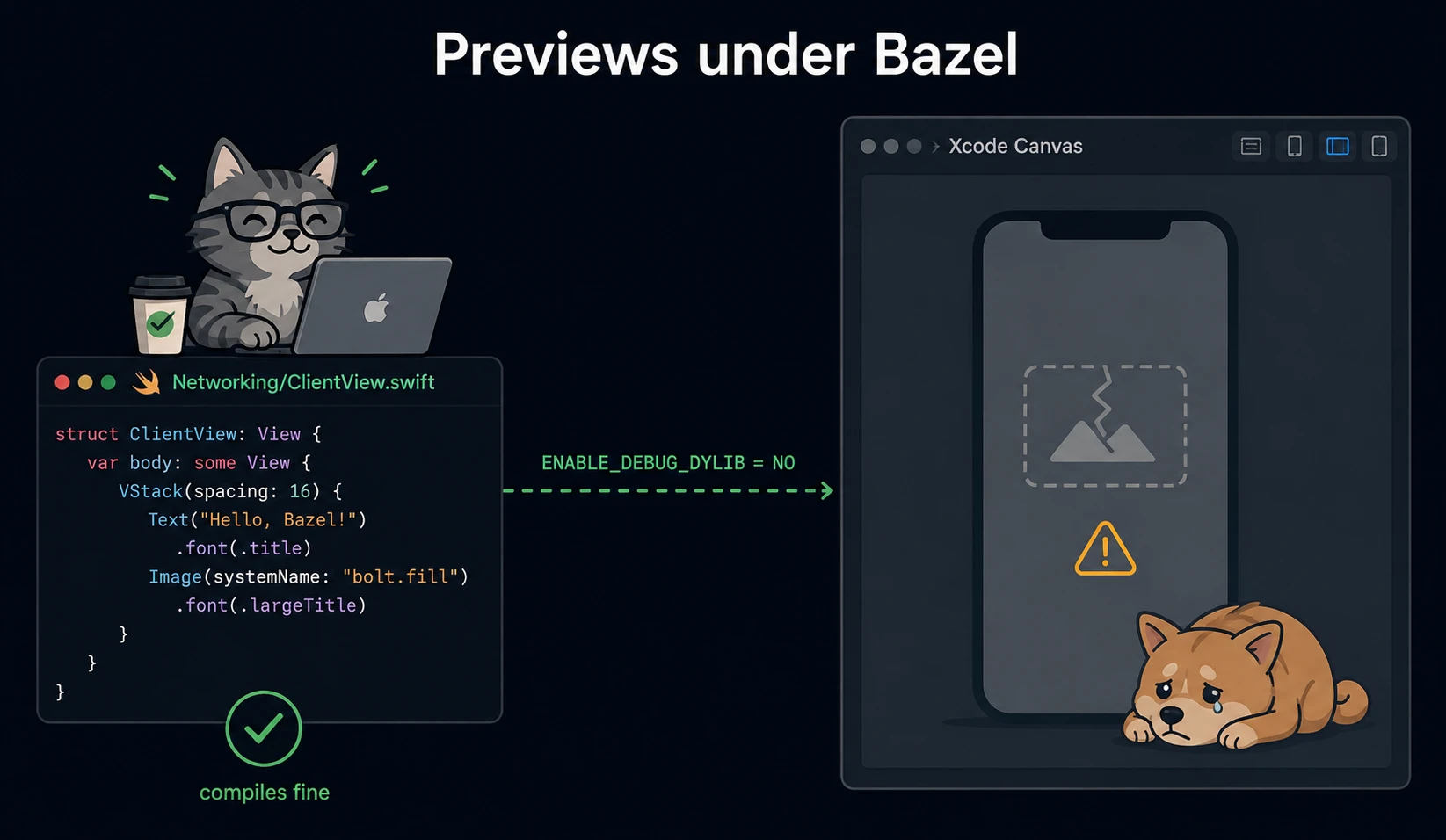
Previews are the problem. The rules_xcodeproj README lists "Xcode Previews" as a supported feature, and for older Xcode versions that was true. But since Xcode 16, previews have been broken in generated projects, and the tracking issue is still open. Xcode 16 replaced the preview execution engine, and generated projects have not caught up. On the ruleset's own example project, previews fail with a linker-parsing error.
There are three concrete reasons behind it:
ENABLE_DEBUG_DYLIB = NOis hardcoded in every generated project. It was set in mid-2024 with the comment "until we can properly support this new feature in Xcode 16". Two years later, it is stillNO. This is the build layout Xcode's modern preview execution for app targets depends on.- Previews do not work with static libraries, and
rules_xcodeprojhas an explicit non-goal of changing how your target builds to enable an Xcode feature. It will not silently promote yourswift_libraryinto a dynamic framework for you. You have to restructure your own graph. - A fix exists — but only as a draft. In August 2026, a contributor opened a draft PR adding support for Xcode 26.5's shared-JIT previews, and reported it working end to end. It is not merged, and no released version contains it.
What people actually do about it:
- Move views out of the app target. This is also Apple's own advice for the same error — put your views in a framework or library module with its own scheme and leave only
@mainin the executable. It is the setup with the best odds. - Keep a side-channel preview environment. One contributor built a small ruleset that generates a
Package.swiftfrom a view target's Bazel dependencies, so you can preview in a throwaway SPM project while the real build stays on Bazel. - Replace previews with hot reloading. A
rules_applecontributor documented using InjectionNext instead, arguing that previews get slow on large projects anyway and often crash when dependency injection is not wired up in the preview. - Use
ibazel. The Bazel file watcher is alive and actively maintained (its latest release was macOS-specific), andibazel test //Features/Cart/...gives you a fast feedback loop that has nothing to do with Xcode.
There is one more Xcode feature to plan around: the Archive action does not work under rules_xcodeproj, and this is documented, not a bug. Releases are built from the command line instead. The good news is rules_apple ships an xcarchive rule and an apple_bundle_version rule that reads your version from the CI build label, so the release path is a bazel build away — it just is not the button in Xcode you are used to.
The honest ledger
What you gain
- Fast, correct incremental builds that rebuild only what truly changed.
- A shared cache between developers and CI — the single biggest win, and the easiest to get.
- Selective testing that is exact, not a heuristic.
- Module boundaries enforced by the build, at analysis time.
- One build system for iOS, Android, and backend code in one repo. For Airbnb, this org-wide consolidation — not iOS speed alone — was the reason to migrate.
- Real observability: every build has a URL, a timing profile, and a cache hit rate.
What it costs
- A steep learning curve. Starlark, a new mental model, and documentation that the community consistently names as its weakest point.
- An owner. Gojek's migration took about a year with one full-time engineer. Spotify runs a standing build-systems team. This is not a weekend project you can hand back to the feature teams.
- BUILD file maintenance. There is no production-grade tool that generates iOS
BUILDfiles for you. The only Swift Gazelle plugin has 10 stars. Spotify solved this by writing their own generator — 2,000+BUILDfiles generated, 30–50 by hand. - SwiftUI Previews and Xcode Archive, as described above.
- Slower IDE experience unless you invest. Indexing has multiple long-standing open bugs. Debugging works, but requires a specific set of path-remapping flags — get one wrong and your breakpoints silently stop binding. Xcode code coverage only arrived in December 2025.
- Ecosystem lag. New Xcode features reach the Apple rule sets months later.
rules_apple5.0 andrules_swift4.0 have both sat in release candidate for months. - macOS-specific friction. Bazel's macOS sandbox is measurably slower than Linux's, and that issue has been open for seven years.
- CocoaPods is a dead end. The Pods-to-Bazel tools are abandoned,
rules_ios(which carried much of that story) is sunset, and CocoaPods itself goes permanently read-only on 2 December 2026. If you are on Pods, that migration comes first — or instead.
One more thing worth saying out loud: iOS is not on Bazel's roadmap. BazelCon 2025 had zero Apple-platform talks, and neither the Q1 nor Q2 2026 community updates mention iOS, Swift, or rules_apple at all. The Apple rules are carried by the community and by a handful of large companies. That is not a reason to avoid Bazel — but it does tell you who will be fixing your problem.
So, should you use it?
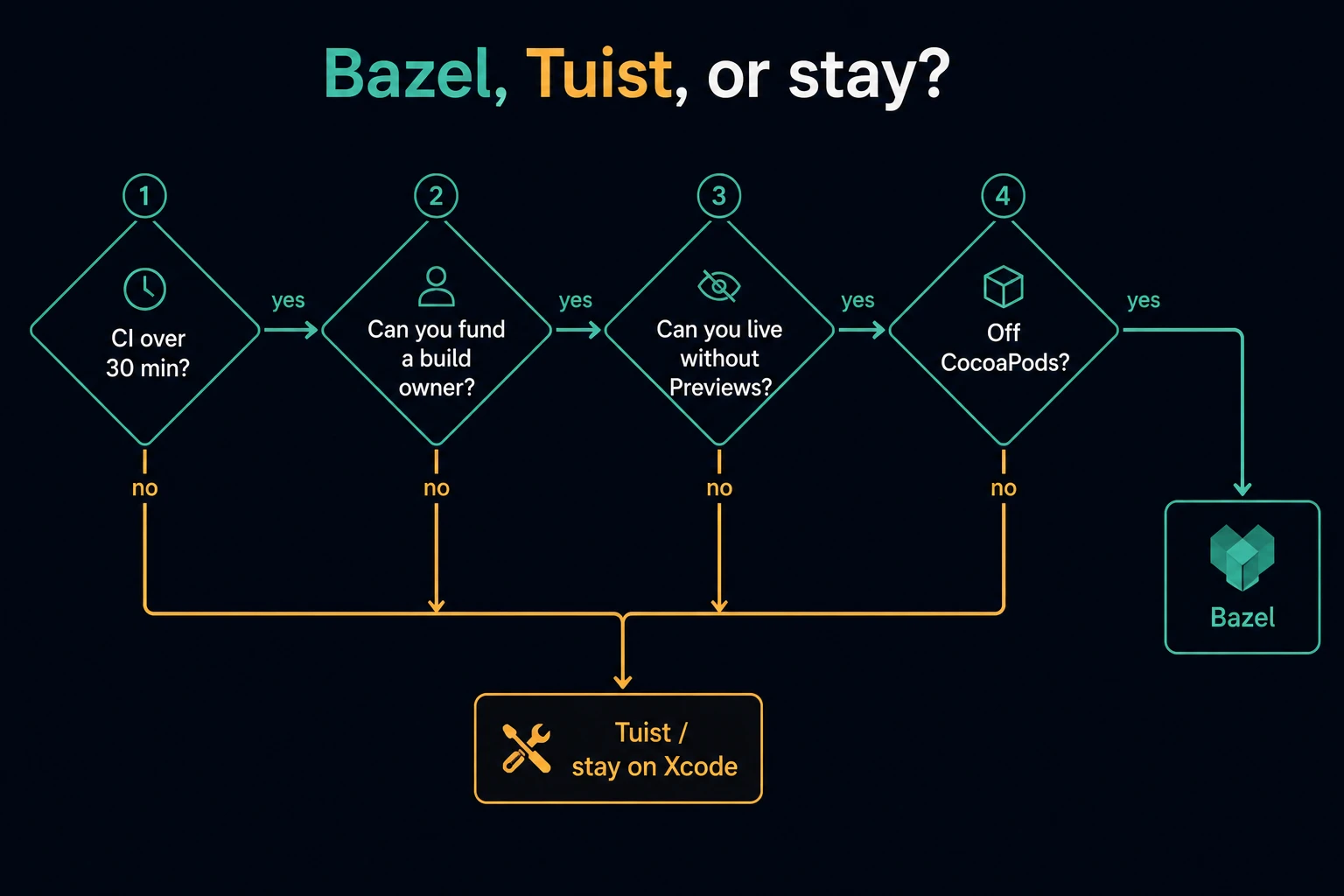
I could not find a published threshold anywhere, and the most recent analysis I read explicitly refuses to give one: "There is no universal threshold of projects, developers, or CI minutes." So here is my own rule, built from what the case studies actually show. Adopt Bazel only if all four are true:
- Your CI feedback loop is measured in tens of minutes. Every published win starts from a 30–80 minute baseline. If you are at 8 minutes, you have nothing to gain and a lot to lose.
- You can fund a build owner indefinitely — not just during the migration.
- You can live without SwiftUI Previews from the app target for the foreseeable future, or you are willing to restructure your view modules.
- You are not on CocoaPods.
If any one of those fails, look at Tuist instead. It generates conventional Xcode projects and keeps Xcode's build engine, which means previews keep working. In 2026 it has binary caching and selective testing — Monzo reported cutting p50 PR time from 52 to 15 minutes at ~200 modules and 1.9M lines of Swift. That is Bazel-class improvement without leaving Xcode's build system. The trade-off is real too: Tuist's selective testing is target-level only, and it does not enforce module boundaries at the compiler level the way Bazel can.
And it is worth noticing where Apple itself is heading. Xcode 26 made explicitly built modules the default for Swift and introduced compilation caching. Apple is slowly converging on the model Bazel has had all along. That narrows the gap — it does not close it, because Xcode still has no shared remote cache and no dependency-boundary enforcement — but it does mean the calculation is different every year.
Try it in an afternoon
You do not have to migrate anything to learn whether this is for you.
- Add BES to an existing Bazel project, or start a toy one. Two lines of
.bazelrcgets you an invocation UI for free. - Turn on the local disk cache.
build --disk_cache=~/.cache/bazel-diskcosts nothing, needs no server, and makes switching git branches dramatically cheaper. For a small team, this is the highest value-per-effort flag that exists. - Build one leaf module. Take a module with few dependencies, write a
swift_libraryfor it, and runbazel teston its tests. You will learn more in that hour than from any blog post — including this one. - Generate the Xcode project.
bazel run //:xcodeproj, then open it. This is the moment you find out how the workflow really feels for you. - Look at the timing profile. Find out where your build time actually goes before you decide what to fix.
If you are working outside Xcode, there is a newer option too: Spotify's sourcekit-bazel-bsp bridges Bazel iOS projects into Cursor and VS Code — and its README now explicitly mentions giving code intelligence to coding agents. That is a very 2026 sentence, and a sign of where this tooling is drifting.
Closing
Bazel is not a better Xcode. It is a different bet: you trade convenience for correctness, and you pay that price up front, in engineering time, before you see anything back.
For a 200-engineer app with a 45-minute CI pipeline, that bet is obviously worth it, and the case studies show it. For a five-person team with a 6-minute build, it is a very expensive way to make your SwiftUI Previews stop working.
The most useful thing I can leave you with is not "use Bazel" or "don't". It is this: the wins these companies report come mostly from a shared cache and an explicit module graph — and you can get a surprising amount of both without Bazel. Fix the graph first. If you still hit the wall after that, Bazel is waiting, and it works.
If you are running Bazel on an iOS app — especially if you solved the previews problem — I would genuinely like to hear how. Find me on GitHub.